Process a pick list
Work a pick list from Waiting through to Done, at the office or at a WAP terminal.
Prerequisites: A pick list exists. Items are in stock at the indicated Warehouse Access Point.
Required permission: Inventory → Pick Lists — User or above. Admins can validate any pick list; Managers and Users only the pick lists they created.
Ready the pick list
Section titled “Ready the pick list”- In the sidebar, click Inventory → Pick Lists and open the pick list.
- If it’s in Draft, click Mark as Todo. Tooling Metrics checks stock at the source WAP and sets each line’s status: Available if the full quantity is in stock, Partial Available if only some is, or Waiting if none is.
- If any line is Waiting or Partial Available, click Check Availability once stock changes to recheck — the pick list moves to Ready once every line is fully Available.
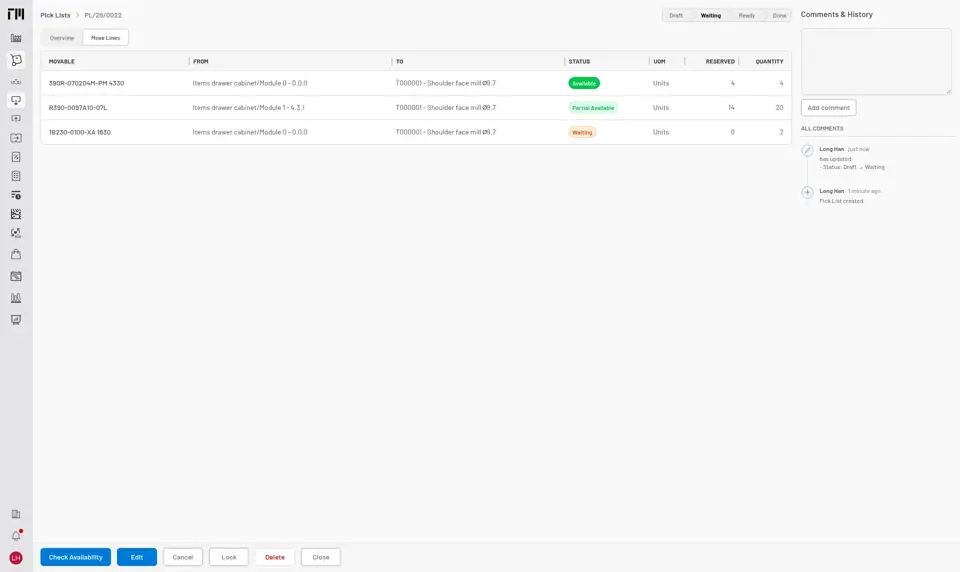
Fig. 1: Lines are rechecked when you click Check Availability.
Pick at the WAP terminal
Section titled “Pick at the WAP terminal”For serialized items, the actual physical pick happens at the ToolingMetrics WAP terminal:
- Open the pick list from the WAP home screen. The warehouse’s 3D model highlights the storage location for the current line.
- Scan or enter the serial number(s) being picked. The line’s reserved quantity and status update as pieces are matched.
- Repeat for each line.
For non-serialized items, availability is tracked by quantity only — no per-piece scan is needed.
Validate
Section titled “Validate”Once every line is Available, click Validate (from the office or the WAP terminal) to move the pick list to Done. On-hand quantity decreases at the source, and the picked items or tools move to their destination — this is the point items become In Circulation.
- Pick lists created for a Tool are already linked to it — validating moves the picked items onto the tool’s Items List, ready to assemble. See Prepare tools for a job.
- To discard a pick list before it’s validated, use Cancel — any reserved quantity is released back to stock.
- If stock runs out mid-pick, the affected line stays Waiting or Partial Available; the rest of the pick list can still be validated once every line clears, or you can cancel and re-pick once stock is replenished.


© 2026 ToolingMetrics. All rights reserved.