How the digital tool flow works
How Tooling Metrics connects every stage of your tool lifecycle and why it works this way.
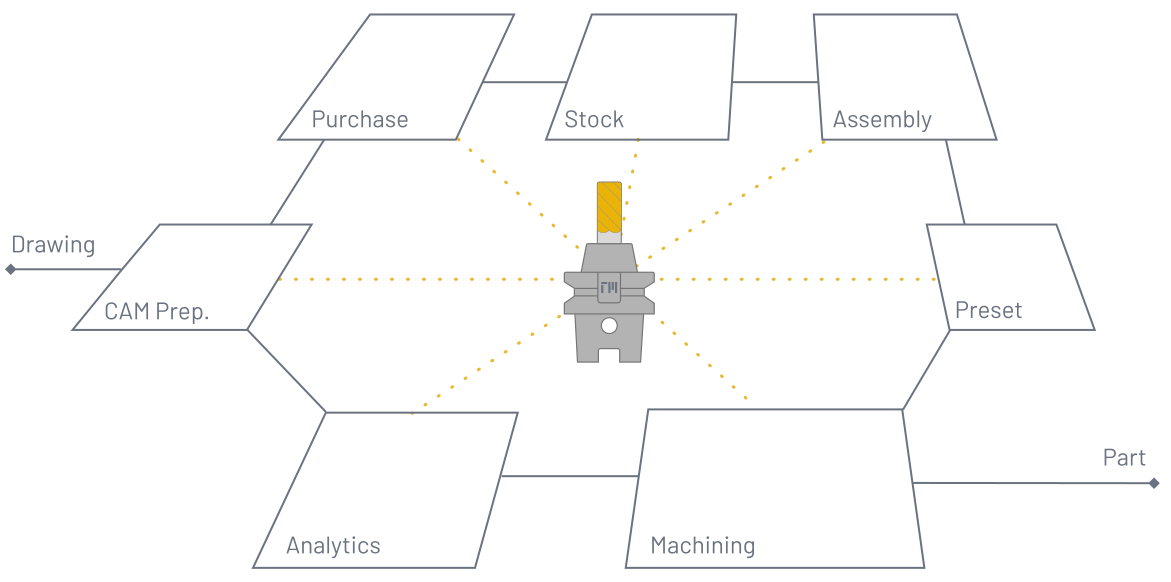
Tooling Metrics models the tool lifecycle as a connected flow of seven stages. Understanding this flow explains why documents and modules are structured the way they are and how data created in one stage becomes available in the next.
Process design
Section titled “Process design”In the process design and planning stage, CNC programmers and process engineers design and document the manufacturing process. Tooling Metrics helps engineers create an optimal process while maximizing current tooling inventory and document the results, giving shopfloor teammates detailed instructions to produce the part — and, with centralized, connected, real-time tooling data across the organization, plan against what machines and tooling are actually on hand.
Part management
Section titled “Part management”Engineers start by creating a Part, entering its number and name, and attaching the drawing or 3D model. They assign a Material from the Library module’s material database or create a custom one.
The manufacturing process is documented by creating a Job and selecting the Machine that will perform the Operations. For each operation, engineers select the Tool Assembly and define a Cutting Data set.
Tool library
Section titled “Tool library”CNC programmers select from available tool assemblies in the company-wide Tool Library, or build new assemblies from the Product library. The system uses automatic connection code matching to ensure compatibility across manufacturers. Filters let users display only products available in inventory or that fit a specific machine’s spindle interface.
The Product Library supports creating tooling products from manufacturer data: images, ISO 13399 .p21 files, 2D drawings, and 3D models. Bulk imports are supported via GTC Packages from tooling vendors, external tool databases, or other tool management systems.
Cutting data optimization
Section titled “Cutting data optimization”Cutting data is one of the most valuable knowledge assets a machining workshop can own. Centralizing the tool library in Tooling Metrics enables continuous optimization of cutting parameters for specific workpiece materials, operations, tools, and machines. The machining calculator helps machinists calculate cutting data, estimate cutting results, and plan tooling requirements.
Process Designer and setup sheets
Section titled “Process Designer and setup sheets”Machining operations can be created manually using the Process Designer inside a Job, or imported automatically from CAM software via CAM Connect. Multiple jobs can be grouped into a Project for multi-setup or multi-machine workflows.
Once finalized, engineers release a job or project for peer review. Release automatically checks the tool assemblies’ required resources against inventory and generates a Setup Sheet — step-by-step instructions for shopfloor personnel with tool assemblies, cutting parameters, and NC program references, plus picking instructions down to the item level: where each physical tool is located, its condition and remaining life, and the Bill of Materials to assemble a new tool if your operator intends to do so.
Purchase
Section titled “Purchase”Tooling products account for a small percentage of total production costs but have an outsized impact on quality and productivity. Tooling Metrics treats tooling items as first-class assets with full lifecycle traceability — including procurement, usage, and service orders for maintenance and reconditioning.
Vendors and manufacturers
Section titled “Vendors and manufacturers”Sourcing partners include Vendors (who supply products) and Manufacturers (who produce them). Purchasers access the same comprehensive product data as process engineers, eliminating redundant manual entry. The shared data standard — powered by ISO 13399 and the Generic Tool Catalog — makes sourcing faster and more reliable.
Automatic purchase design
Section titled “Automatic purchase design”When engineering approves a project or job, every product referenced by its tool assemblies is automatically synced to the company’s Items database — no separate sync step required. Purchasers define Stock Rules — specifying item, storage location, condition, and min/max quantities — and the Inventory Scheduler runs on a schedule, independent of engineering approval, comparing forecast quantity against each rule and automatically drafting purchase requests when stock falls below the minimum.
Stock rules also route stock by condition: a rule can target a for-service location, so that a serialized item whose usage crosses its own service threshold (time, cycles, cost, or remaining value) gets moved toward the right place automatically, ready for someone to send it out for regrinding, calibration, or maintenance.
Integrated purchase and inventory
Section titled “Integrated purchase and inventory”When an order is confirmed, the Purchase Receipt and Purchase Restock are generated automatically. This guides the inventory controller to process goods receipts and place items in the exact storage location specified by the stock rule — made possible by the warehouse digital twin.
Inventory
Section titled “Inventory”The Tooling Metrics inventory system is a digital twin of your entire warehouse. You build this twin by grouping Storage Devices into Warehouse Access Points based on their physical location in your workshop.
Warehouse digital twin
Section titled “Warehouse digital twin”A storage device consists of multiple Storage Modules, each divided into Storage Locations. Assigning each location an address, dimensions, and position gives you a complete 3D model of your warehouse. Tooling Metrics uses this configuration to guide inventory operations to exact locations.
Every stock movement — receipts, restocks, pick lists, return lists, transfers, and scrap — is recorded as a move line. Move line status drives on-hand and forecast quantities, giving you both real-time physical and forecasted inventory levels. Tooling Metrics also tracks in-circulation quantity — items picked for use on tools and machines. For a full list of operation types and their fields, see the Inventory Reference.
Serialized items
Section titled “Serialized items”Serialized Items assigns each physical piece a serial number, enabling tracking of its location, condition, cost value, service information, move history, usage history, and tool life throughout its entire lifecycle. Cutting tool manufacturers are increasingly printing data matrix codes on each piece, making serialization straightforward.
Self-service inventory
Section titled “Self-service inventory”Stock Rules and Automatic Purchase maintain a well-organized warehouse by automatically drafting necessary stock movements. Setting up rules ensures the right tool is in the right place at the right time, in the correct quantity and condition, for each job.
Refurbishing serviceable serialized items can be automated using service thresholds. The system triggers service requests based on usage cycles, usage time, usage cost, or remaining cost.
Assembly
Section titled “Assembly”A Tool Assembly is the tool’s digital master — all properties as designed. A Tool is the digital twin of its physical counterpart on the shopfloor, inheriting designed data from the master and gathering real usage data throughout its lifecycle.
Tool digital twin
Section titled “Tool digital twin”When an operator needs a tool for a job, the job Setup Sheet lists the Tools List — all physical counterparts, whether in a warehouse location or a machine tool crib. The operator can also consult the Bill of Materials for required items with inventory quantities.
To assemble a new tool, the operator creates a new Tool record in Tooling Metrics, selects the tool assembly, and generates a Pick List in one click. The warehouse digital twin provides step-by-step guidance to pick every item.
A Tool Tag can be printed with a unique Tool ID and barcode/data matrix for machine-readable tracking.
- Tools can be transferred to a machine via Tool Transfer, returned via Return List, or moved via Pick List or Transfer like any inventory item. All movements are recorded in Move History.
- Setting the tool’s life limit enables tracking of remaining life, usage life, and cutting edge condition.
- Assembly and disassembly movements are recorded in Assembly History.
In-machining
Section titled “In-machining”Tools checked into a machine can be assigned slot numbers matching their position in the machine’s tool magazine/turret. This helps CAM programmers generate ready-to-run NC programs by renumbering tools based on what’s physically in the machine crib — speeding up setup and preventing tool number conflicts as well as putting all idle tools to work.
Operators update tool life data after completing a work shift or when returning tools. Tools can be shared between machines, reducing required inventory while maintaining availability. Operators can proactively prepare and set up new jobs while the machine spindle is running, reducing setup time and increasing machine OEE and tool utilization.
Machining analysis
Section titled “Machining analysis”Tool data is automatically captured across the lifecycle and can be analyzed in real time using Dashboard templates or custom widget layouts.
Tool cost analysis
Section titled “Tool cost analysis”Usage cost is posted automatically when an item or a tool is picked for machine use, using the item’s own cost allocation method or that of its Internal Category. Usage cost reports can be grouped by item, date, user, or machine, enabling precise cost-per-piece calculations.
Tool life analysis
Section titled “Tool life analysis”Cutting edge item lifetime is recorded via serialized items and the tools holding them, enabling benchmarking of both overall performance and variability — down to individual cutting edges.
Inventory analysis
Section titled “Inventory analysis”Inventory valuation reports provide insight into both on-hand valuation and in-circulation valuation. Valuation can be grouped by category, vendor, storage device, machine, or warehouse, and displayed as tables or charts.
Administration
Section titled “Administration”Tooling Metrics is fully configurable without requiring a dedicated IT team. Start with looser rules during initial setup and tighten them as your workflow stabilizes.
- Groups — Define any combination of permission levels (Admin, Manager, User) per record type.
- Sequences — Customize automatic document numbering to match your organization’s practices.
- Currencies / Units of Measure — Support multi-currency orders and multiple inventory units.
- Document History — Every document has a complete change log tracking who changed what and when.
- Comments — Team members collaborate inline, keeping all discussion in context with the document.
Where to go next
Section titled “Where to go next”Ready to set up your own digital tool flow? Start with the Quickstart series for hands-on tutorials, or continue with these platform concepts:
- Interfaces — How to navigate between modules and documents, using search, filters, document views, status badges, and toolbar actions.
- Glossary — Definitions for every term, concept, and object used across the platform.


© 2026 ToolingMetrics. All rights reserved.