Record tool runtime
Enter how long a tool ran when it comes back from a machine.
Prerequisites: A tool has been running in a machine and is being returned from it.
Required permission: Inventory → Return Lists — User or above, to validate the Return List the usage step opens from. Admins can validate any return list; Managers and Users only the return lists they created.
Tooling Metrics doesn’t log runtime as a separate entry you create on the tool record — it’s captured in one step, right when the tool physically leaves the machine.
Record runtime on return
Section titled “Record runtime on return”- Process the Return List for the machine the tool is coming from, and click Validate.
- A Record cutting edge usage step opens automatically, grouping the mounted cutting edges under every tool that just came back from that machine.
- For each cutting edge, set the toggle to Add to to add the latest run to its current usage, or Set total to replace the total, then enter the value.
- Toggle Broken if that cutting edge failed during the run.
- Click Save usage. (Click Skip to close the step without recording usage.)
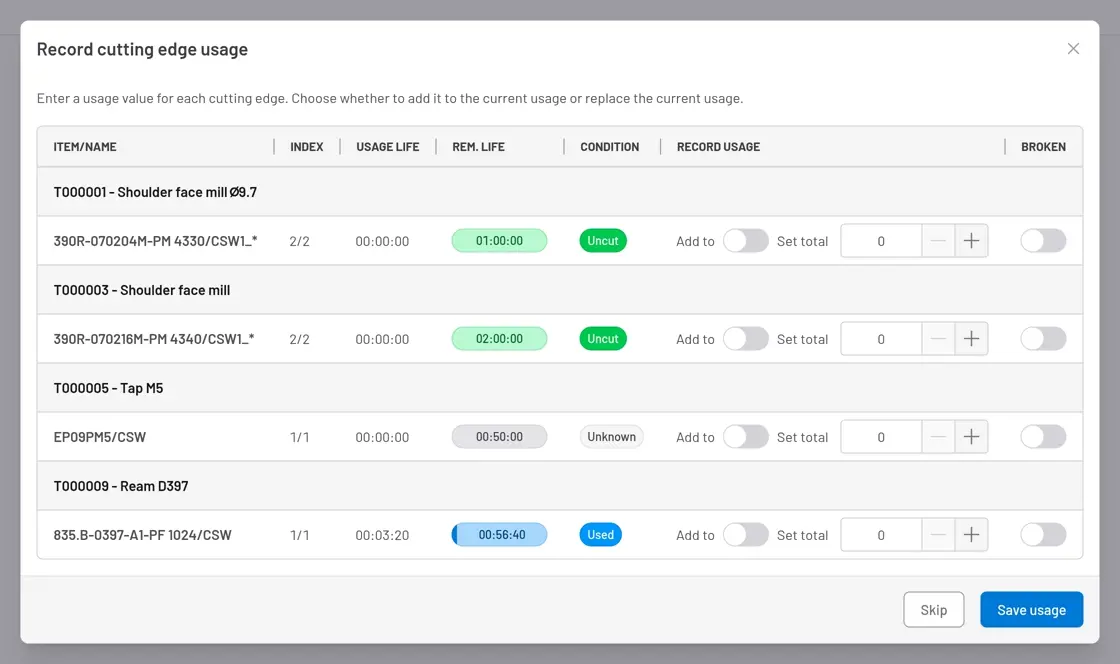
Fig. 1: Record cutting edge usage — appears automatically after validating a return list or tool transfer from a machine.
What happens next
Section titled “What happens next”- Usage Life on each cutting edge increases by the amount entered (or is replaced by it, with Set total), and Remaining Life (Life Limit minus Usage Life) recalculates.
- Condition recalculates for each cutting edge from its new Usage Life / Life Limit ratio — moving to Pre-warning at 80% consumed, Warning at 95%, and Expired at 100% — unless you marked the edge Broken, in which case its Condition is set to Broken directly.
- Saving cutting edge usage does not change any Serialized Item’s condition. Service thresholds (usage time, cycles, or cost) on serialized pieces are a separate mechanism — see Track tool condition.
- Usage cost is never posted when runtime is recorded. For cost-per-pick items it is posted at the moment a Tool Transfer or Pick List lands the tool (or an item picked directly onto it) on a machine; every item currently assembled in the tool posts its own cost line at that moment. For time-based items it is posted once a day (around 23:30 in the organization’s time zone) for every item still on a machine, covering the hours since it arrived or since its last posting. See Review a tool’s lifecycle history to see posted costs.
- When a cutting edge is later replaced, its accumulated Usage Life is captured as a Life History entry on the tool, and Usage Life resets to zero for the new edge.


© 2026 ToolingMetrics. All rights reserved.