Return tools
Validate the return, enter runtime, and decide whether to disassemble the tool.
Prerequisites: A return list from a machine is Ready (see Record runtime). Required permission: Inventory → Return Lists — User or above. Admins can validate any return list; Managers and Users only the return lists they created.
Validate the return
Section titled “Validate the return”- Physically bring the tool back to the WAP.
- Open the return list and click Validate.
The tool’s location moves off the machine — on-hand quantity increases at the destination, in-circulation decreases, and its slot in the machine’s tool crib clears automatically.
Enter the runtime
Section titled “Enter the runtime”Validating a return list sourced from a machine immediately opens a Record cutting edge usage step, listing the mounted cutting edges of every tool that just came back.
- For each cutting edge, leave the toggle on Add to and enter the usage it accumulated on this run (or switch to Set total to replace its total usage).
- Toggle Broken if that cutting edge failed during the run.
- Click Save usage.
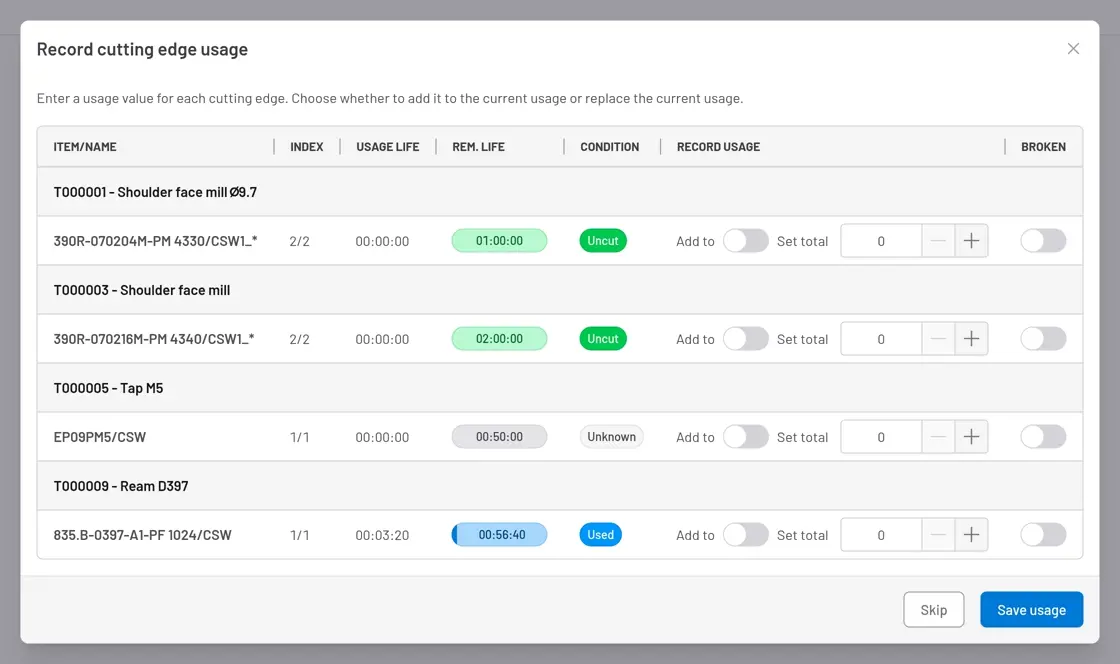
Fig. 1: This is the moment runtime is recorded — right as the tool leaves the machine.
Keep it assembled, or take it apart
Section titled “Keep it assembled, or take it apart”The tool is now back at a storage location or WAP, still fully assembled — nothing forces you to disassemble it. If it’s going straight to another job, leave it as is; its identity and history carry over.
To disassemble it instead — returning its individual mounted items back into bulk or serialized inventory — create a second Return List with the Tool itself as the source:
- In the sidebar, click Inventory → Return Lists → + Create, and set the Source to the tool.
- Tooling Metrics prefills a line for each item currently mounted in it.
- Work it through Mark as Todo → Validate, same as any return list. If it stops at Waiting, click Check Availability before validating.
What to expect
Section titled “What to expect”- On-hand quantity increases at each destination; in-circulation decreases.
- If a disassembled piece is a serialized cutting edge, removing it from the tool logs a Life History entry — the runtime it accumulated — and resets the tool’s Usage Life to zero.
Check and scrap a worn piece — record the condition of returned pieces so worn or scrapped ones are excluded from future jobs.


© 2026 ToolingMetrics. All rights reserved.