Review a tool's lifecycle history
Trace everything a tool has been through — movements, assemblies, posted costs, and recorded lives — from one record.
Prerequisites: The tool has been in use — picked, transferred, or run on machines. New tools have empty history tabs.
Required permission: Production → Tools — User or above; Inventory → Serialized Items — User or above to trace a piece. A User sees only the records they created.
Every tool record keeps its full history in tabs. Together they answer the lifecycle questions: where has it been, what was it built from, what has it cost, and how long has it lasted.
Open the history tabs
Section titled “Open the history tabs”- In the sidebar, click Production → Tools and open the tool.
- Work through the tabs across the top of the record:
| Tab | What it shows |
|---|---|
| Cutting Edges | The cutting edges fitted to the tool and their current condition. |
| Items List | The items currently mounted in this tool, with quantity and condition. |
| Assembly History | Every assembly and disassembly event — which items went in or out, and when. |
| Moves History | Every movement — storage to machine, machine to assembly station, and back — with dates and the user who validated each move. |
| Usage History | Every usage cost line posted for this tool’s items on machines. |
| Life History | Recorded tool lives — runtime accumulated per life and the condition the tool ended each life in. |
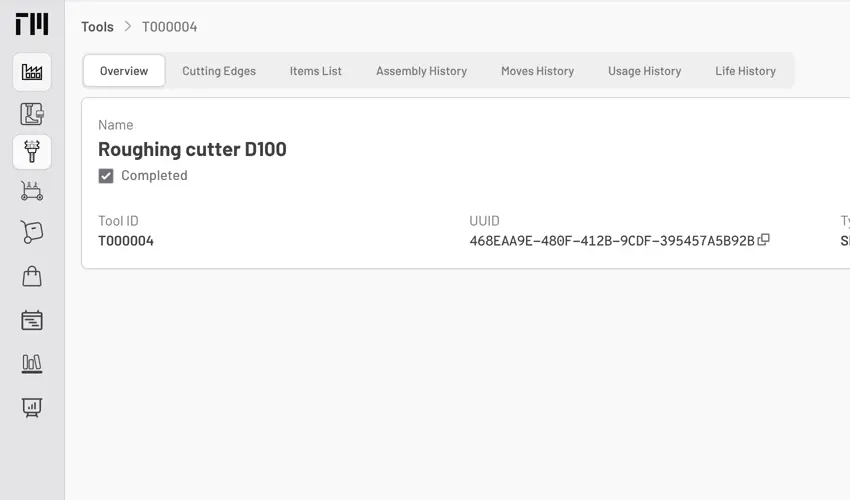
Fig. 1: The tool record tabs — each one is a different lens on the same physical tool’s history.
Read the lifecycle from the tabs
Section titled “Read the lifecycle from the tabs”- Where has it been? Open Moves History. Reading bottom-up gives the tool’s full journey since creation.
- What was it built from? Open Assembly History. Each cutting edge replacement shows as a disassembly of the worn item and assembly of the new one.
- What has it cost? Open Usage History. The sum of cost lines is the tool’s accumulated usage cost; each line names the machine that consumed it.
- How long does it last? Open Life History and compare each recorded life against its life limit. A new entry is added — and Usage Life resets to zero — every time a cutting edge is removed from the tool. Consistently short lives point to cutting parameters or assembly problems; see Record Runtime for how lives accumulate.
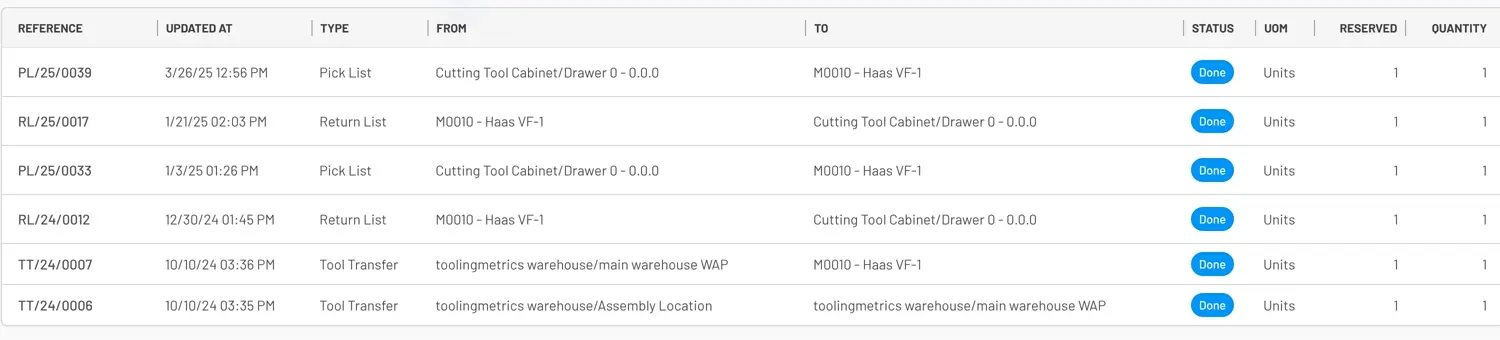
Fig. 2: Moves History shows each movement’s reference, date, type, source, destination, status, and quantity.
Trace a serialized item across tools
Section titled “Trace a serialized item across tools”High-value serialized items (e.g., precision holders) outlive any single tool assembly. To follow one across its whole service life:
- In the sidebar, click Inventory → Serialized Items and open the item by serial number.
- The Overview shows current status and remaining value; Moves History shows every tool, machine, and service order it has passed through; Usage History shows every cost posted against it.
- The Comments & History panel at the bottom of the tool record adds the human trail — status changes and user comments with timestamps.
- For condition semantics (Uncut, Used, Pre-warning, Warning, Expired, Broken), see Tools Reference.
- Batch-level (non-serialized) items aggregate their history on the item record itself — open Inventory → Items → Moves History for the batch view.


© 2026 ToolingMetrics. All rights reserved.