Import GTC package
Bulk-import a cutting tool manufacturer's product catalog into Tooling Metrics from a GTC package file.
Prerequisites: GTC package file downloaded from the manufacturer: see Find a manufacturer’s GTC package, or the Quickstart for the demo’s package.
Required permission: Library → Products — User or above.
Getting a GTC package from your manufacturers is the best way to quickly and accurately import your existing product.
In this tutorial you will import a package provided by the Sandvik Coromant1.
Import GTC package
Section titled “Import GTC package”After downloading the package file, follow these steps to import it to your product library.
- In the sidebar, click Library → Products.
- Click the Import button in the navigation bar.
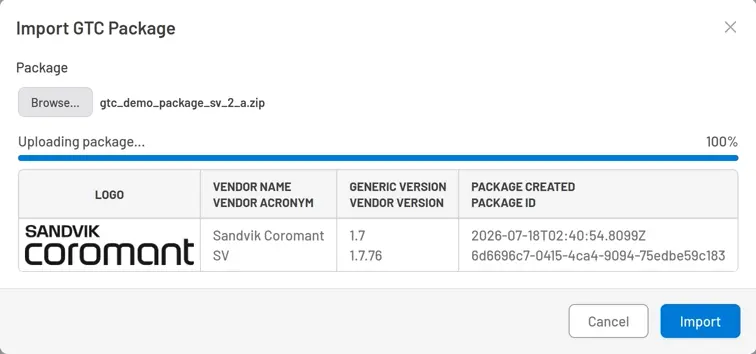
- In the import dialog, click Choose File and select the Sandvik GTC package zip file.
- Verify the package metadata that appears — vendor name, acronym, hierarchy version, and package creation date. The file is uploading in the background at the same time; the Import button enables once that finishes.
 (full size)
 - Click Import. The dialog closes automatically after the import job is submitted. Watch for a red dot on the bell icon at the bottom of the sidebar — click it to open Notifications.
- When the import job finishes, a notification appears. Click Download button to download and review the import detail report. Any products that failed to import are listed with the reason.
What to expect
Section titled “What to expect”After the import completes, click Products in the sidebar to refresh the list. Your library now contains several dozen products from Sandvik Coromant, each with:
- Product picture and family picture
- ISO 13399 parameters parsed from the
.p21data file - 2D drawing and 3D models attached
- Operations, interfaces, coordinate systems, and cutting reference points set automatically
What’s in a GTC package
Section titled “What’s in a GTC package”A package file contains a few xml files to define the product assortment, class hierarchy and the metadata about the package itself. Each product in the package has its own picture, family picture, data file P21, drawing DXF, basic model, and detail model STP. All of those files are packed in a ZIP file, enabling a productive data exchange model between cutting tool vendors and applications.
Next steps
Section titled “Next steps”Create a Custom Product to create products directly from the assets file when no GTC package available.
Footnotes
Section titled “Footnotes”-
Use of this package or products does not imply we have any partnership, affiliation with, or endorsement by its manufacturers. This is solely because any registered user can download the package or asset files from their website, so that you can follow this guide without any obstacle. ↩


© 2026 ToolingMetrics. All rights reserved.