Build a tool from a setup sheet
Create a Tool from a Tool Assembly and generate a pick list for its components.
Prerequisites: A job has been released and its setup sheet is available. Required permission: Production → Tools — User or above; Engineering → Projects and Engineering → Jobs — User or above to read the job’s tool list (a User sees only the records they created).
A Tool is the physical counterpart of a Tool Assembly — the actual cutting tool that will sit on your workbench or in the machine. Building one creates a Tool record linked to the assembly, ready to have its Serialized Items assembled into it, and it generates a pick list to gather everything from the warehouse.
Find what the job needs
Section titled “Find what the job needs”- Open the job from Engineering → Projects → [your project] → Process → [your job] and open its setup sheet, or its Tool List tab.
- Each row is one Tool Assembly the job’s operations call for, with its T-code and required components. Note the assembly you want to build first.
Build the tool
Section titled “Build the tool”- In the sidebar, click Production → Tools → + Create.
- Select the Tool Assembly you noted from the Tool List.
- Choose the Location and enter a Name; the current form does not include a Life Limit field.
- Save. A Tool ID is assigned automatically and the tool starts in Draft status.
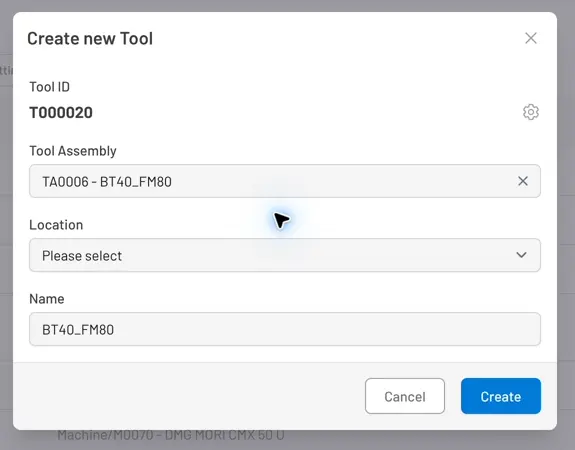
Fig. 1: Building a Tool — select its assembly and location, then confirm or edit the suggested name. The current form has no Life Limit field.
Generate a pick list
Section titled “Generate a pick list”- On the tool record, click Create Picklist.
- Tooling Metrics compares the assembly’s bill of materials against what’s already on the tool, and searches every Warehouse Access Point for the rest — creating a Pick List for each WAP that has stock for the missing components.
What to expect
Section titled “What to expect”The pick list is ready for the next step — physically collecting the components from the warehouse.
Process your first pick list — follow the pick list to collect every component.


© 2026 ToolingMetrics. All rights reserved.